

A door and window schedule fails when the table stops matching the plan.
One wrong tag can turn into the wrong quote, the wrong rough opening, a late order, a field patch, or a failed inspection. The schedule has to do one plain job: connect every door and window on the drawings to the size, type, material, hardware, glass, rating, and notes needed to buy and install it.
Keep the table lean. Keep the marks stable. Check the schedule against the plan before pricing, permit review, or construction issue.

What a Door and Window Schedule Does
A schedule is the bridge between a plan tag and the thing that gets ordered.
The plan might show D-101 or W-204. The schedule tells the builder what that tag means: size, type, frame, swing, glass, hardware, rating, energy data, and remarks. If the tag appears on the plan but not in the schedule, someone has to guess.
That guess can cost money.
On a small house, the schedule may fit on one sheet. On a larger project, doors and windows should usually be split into separate tables. Exterior windows need energy and glazing data. Doors need hardware, swing, frame, and rating logic.
The best schedule is boring in a good way. Every row reads the same way. Every mark is traceable. No one has to hunt through five notes to understand one opening.
How Tags Connect the Plan to the Schedule

Start with the plan, not the spreadsheet.
- Tag every door and window on the floor plan.
- Match each tag to one schedule row.
- Confirm the same tag appears on elevations, sections, or details where needed.
- Check the schedule count against the plan count before the set is issued.
A simple door mark might use the room number, such as D-101 for a door serving Room 101. A window mark might use type and sequence, such as W-1, W-2, and W-3. The system matters less than consistency.
Avoid late renumbering. If marks change after pricing or permit review, cloud the change, update the issue log, and check every linked elevation and detail. A stale tag can survive longer than anyone expects.
For basic drawing context, keep related pages close: architectural drawings, reading blueprints, and architectural drawing symbols.
What to Include in a Door Schedule
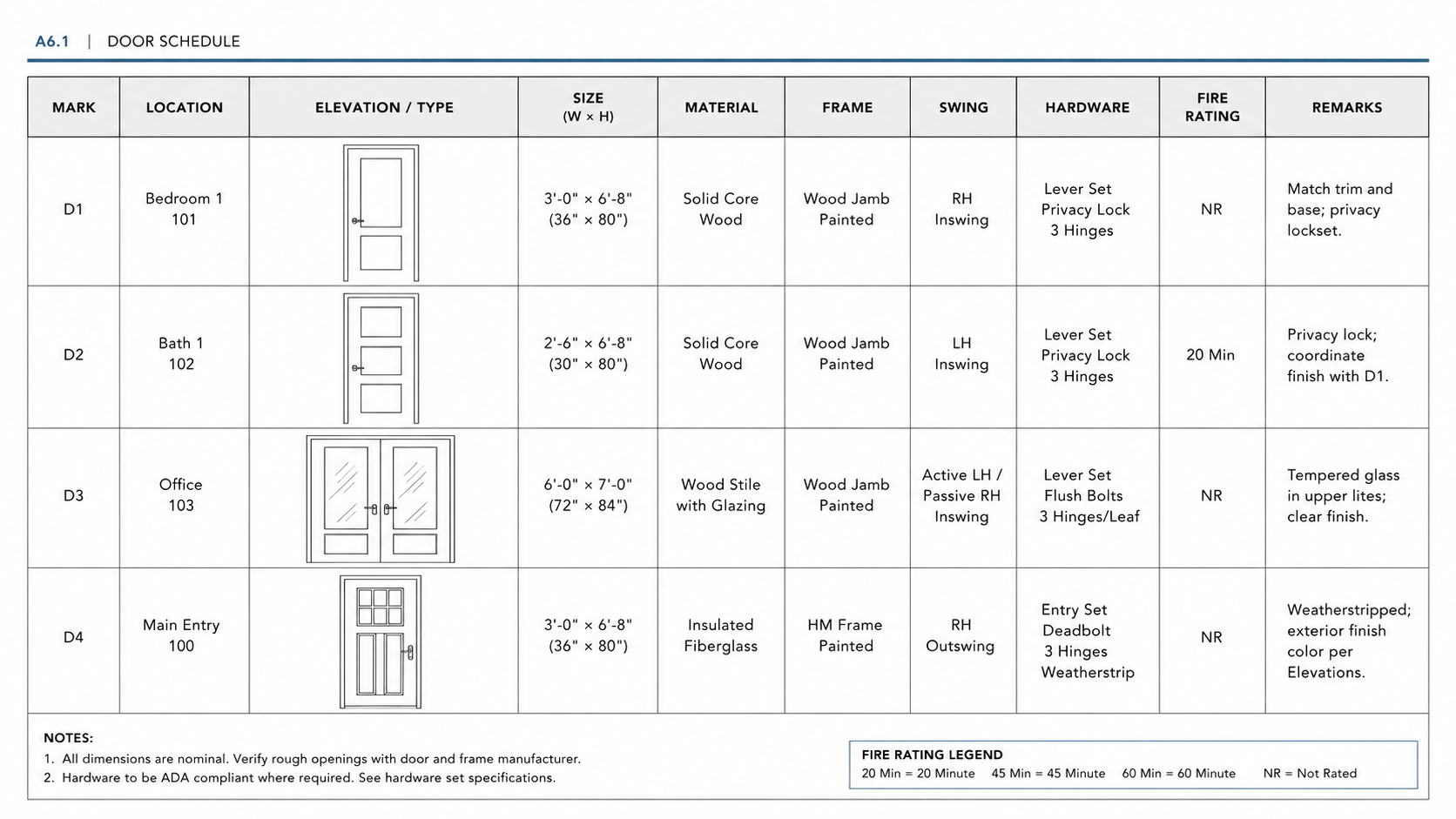
Door schedules carry more than width and height. They tell the field how the opening works.
| Door field | What it controls | Why it matters |
|---|---|---|
| Mark | Door ID on plan | Connects the plan tag to the schedule row. |
| Type | Door style or elevation | Prevents the wrong leaf, lite, panel, or profile. |
| Size | Width, height, thickness | Controls ordering, frame prep, and clear opening. |
| Hand and swing | Left/right hand, in/out swing | A wrong swing can block circulation or egress. |
| Door material/core | Wood, hollow metal, fiberglass, solid core, rated core | Affects durability, sound, fire rating, and cost. |
| Frame | Frame material, profile, rating | The frame rating must match the opening requirement where rated. |
| Hardware set | Hinges, lock, latch, closer, panic, seals | Controls how the door functions and passes inspection. |
| Vision lite | Glass size and rating | Rated openings need rated glass and compatible kits. |
| Accessibility flags | Clear width, threshold, hardware, closer | Helps catch width and hardware problems before review. |
| Remarks | Special notes | Use only for notes that cannot fit cleanly elsewhere. |
Keep the door schedule tight. A door row is not the place for a full product essay. Put long hardware descriptions in a hardware legend and reference the set code in the schedule.
What to Include in a Window Schedule
Window schedules need size and type, but exterior windows also need performance data. That is where many weak schedules break down.
| Window field | What it controls | Why it matters |
|---|---|---|
| Mark | Window ID on plan or elevation | Connects each unit to one schedule row. |
| Type/operation | Fixed, casement, awning, slider, double-hung | Controls ventilation, egress, hardware, and cost. |
| Size | Width and height | Coordinates rough openings, elevations, and orders. |
| Frame material | Vinyl, wood, aluminum, steel, fiberglass | Affects cost, thermal performance, durability, and detailing. |
| Glazing | Double pane, low-E, tempered, laminated, obscure | Controls energy, safety, privacy, and code triggers. |
| U-factor | Heat transfer through the unit | Exterior units often need documented energy values. |
| SHGC | Solar heat gain | Important for climate, orientation, and energy compliance. |
| Egress note | Net clear opening and sill height where required | Sleeping rooms and basement bedrooms can fail review if this is missed. |
| Safety glazing | Tempered or laminated glass where triggered | Needed near doors, tubs, stairs, guards, or other hazardous locations. |
| Remarks | Special notes | Use for screens, restrictors, limiters, or sill/head coordination. |
Exterior window rows should not leave energy fields blank. If the final number is not available yet, mark it TBD. Do not invent U-factor or SHGC values from memory.
For related technical pages, connect this section to energy-efficient windows, window rough openings, and window header framing.
Sample Door and Window Schedule Fields
Use separate tables when the project has more than a few openings. A combined door and window schedule can work for a tiny project, but it gets clumsy fast because doors and windows carry different data.
| Schedule | Minimum fields | Add when needed |
|---|---|---|
| Door schedule | Mark, type, size, hand, material, frame, hardware set, remarks | Fire rating, frame rating, vision lite, louver, ADA, panic, STC, access control |
| Window schedule | Mark, type, size, operation, frame, glazing, remarks | U-factor, SHGC, safety glazing, egress, screens, restrictors, head/jamb/sill type |
One clean row beats five vague notes. If a field affects ordering, inspection, energy compliance, fire rating, accessibility, or rough framing, it belongs in the table.
Numbering That Does Not Fall Apart

A door mark should survive revisions.
If a plan starts with D-101, D-102, and D-103, protect those marks unless there is a strong reason to change them. Renumbering looks harmless in the model, but it can break vendor quotes, hardware sets, submittals, and field markups.
For houses and small projects, room-based marks are simple. For larger work, use level, zone, or facade logic. A window on the second floor might be W-204. A storefront unit on the east facade might use an elevation zone. The goal is not clever naming. The goal is fast tracing.
Run this check before issue:
- Every plan tag appears once in the schedule.
- Every schedule row appears on the plan, elevation, or detail.
- Revised tags are clouded and logged.
- Door and window counts match the sheets being issued.
Type Data vs Instance Data
In BIM, some information belongs to the type. Some belongs to the individual opening.
Put repeated geometry at the type level: size family, door style, window operation, frame material, typical glass, and finish. Put project-specific behavior at the instance level: rating, hardware set, access control, From/To rooms, egress flag, and special notes.
This keeps edits safer. If twenty bedroom windows share the same type, one type edit can update the geometry. If one of those windows is an egress unit, that egress note should stay with that exact instance.
Bad parameter setup causes quiet damage. A drafter changes one type to fix one opening, then every matching unit changes with it. That can throw off elevations, energy data, rough openings, and quotes.
Hardware Sets Without the Mess
Do not paste long hardware lists into every door row.
Use a short code such as Set 1A, then place the full set in a hardware legend. That keeps the schedule readable and makes revisions safer.
A clean hardware set follows the order a door is built and adjusted:
- Hinges
- Latch or lock
- Cylinder and strike
- Closer, stop, seals, threshold, and accessories
Electrified hardware needs extra care. Card readers, electric strikes, power transfers, door position switches, and access control notes should not live in a random remark. Flag them clearly. They affect wiring, security scope, coordination, and inspection.
Rated doors need the door rating and the frame rating. If the door has glass, show the vision lite rating too. A rated leaf in the wrong frame is still a problem.
For related construction detail pages, use door frames and NFPA 101 Life Safety Code where the article needs life-safety context.
Where the Schedule Breaks After Pricing
The schedule does not stop causing problems when the drawings are issued.
A weak schedule travels into the quote. The supplier prices the wrong size. The framer builds the wrong rough opening. The installer arrives with a door that swings the wrong way. The inspector asks why the safety glazing is missing. Then the fix becomes a change order, not a drafting cleanup.
Watch the handoff points:
- Quote stage: the vendor prices from the table, not from your design intent.
- Framing stage: rough openings are built before final units arrive.
- Submittal stage: substitutions can change glass, hardware, frame depth, or energy values.
- Inspection stage: missing rating, egress, glazing, or accessibility data can stop approval.
The protection is simple but not glamorous: keep one current issue set, track substitutions, compare returned submittals against the schedule, and update the schedule before the field builds from stale information.
This is where small mistakes get expensive. A wrong window size can mean reframing. A wrong door hand can block a hallway. Missing safety glazing can mean replacement after installation. Missing energy data can delay permit or final review depending on the project and jurisdiction.
Revit, Archicad, and Spreadsheet Workflow
Revit and Archicad can both produce strong door and window schedules when the model is set up with discipline. The software is not the hard part. The hard part is deciding which fields matter and keeping them consistent.
Revit Schedule Workflow
In Revit, use model-driven schedules for doors and windows. The schedule should pull from the model, not from a separate hand-typed table. Use custom project parameters or shared parameters for fields the office wants to repeat across projects. Use key schedules for repeated information such as hardware sets where the workflow supports it.
Good Revit habits:
- Keep size, type, material, and finish at the type level.
- Keep hardware, rating, access control, ADA, panic, and From/To data at the instance level.
- Filter schedules by level, phase, fire rating, type, or custom parameter when the project is large.
- Export a clean CSV only after the model schedule has been checked.
Archicad Schedule Workflow
In Archicad, Interactive Schedules can automatically generate and edit schedule data when door and window objects are named and classified cleanly. Keep the same naming rules across libraries. Avoid custom one-off object names unless the project truly needs them.
For Archicad, the common failure is blank or inconsistent object data. If the schedule depends on a field, make sure the field is part of the office template and not something each drafter fills differently.
Spreadsheet Workflow
Spreadsheets are useful for checking and vendor review, but they should not become the only source of truth unless the project is very small.
- Export from BIM to CSV.
- Normalize units, casing, and Yes/No fields.
- Check missing ratings, U-factor, SHGC, safety glazing, and hardware sets.
- Compare returned vendor edits against the original export.
- Re-import only after testing in a copy of the model.
The spreadsheet is a checking tool. The drawings and model still need to agree.
Best Way to Connect BIM Schedules to Suppliers
Do not think of Revit, Archicad, or Excel as a magic pipe to the factory. That is how mistakes get buried.
The better workflow is controlled handoff: model schedule first, clean export second, supplier review third, submittal check fourth, then update the model and drawings. Each step needs a record of what changed.
- Build the schedule in BIM. Door and window marks, types, sizes, ratings, and basic notes should come from the model where possible.
- Export only the fields the supplier needs. Do not send a bloated table with twenty empty columns. Send marks, sizes, types, frame notes, glass, hardware set codes, ratings, and remarks.
- Ask the supplier to mark changes, not rewrite the whole table. Returned data should show what changed: size, glass, frame, rating, lead time, or product substitution.
- Compare the return against the issued schedule. Do not paste supplier data blindly into the model.
- Update the BIM schedule and issue log together. The field needs to know which schedule is current.
Door hardware has the deepest BIM-to-supplier workflow because hardware sets are complicated. Platforms such as ASSA ABLOY Openings Studio and Allegion Overtur are built around door, frame, hardware, and opening coordination. They can help move door data between Revit and a supplier or hardware consultant workflow, but they still need clean project data and review by the design team.
Windows are different. Most window manufacturers and BIM libraries can give you model content, product data, or family/object downloads, but the final schedule still has to match the quote, energy values, safety glazing, rough opening assumptions, and installation details. Do not assume a downloaded model object equals an approved product.
Use this rule: BIM tracks the design intent. Supplier data confirms the purchasable product. If those two disagree, stop and resolve it before framing or ordering.
What Factories and Suppliers Need From the Schedule
A supplier does not need a poetic description of the opening. They need enough information to quote, fabricate, package, ship, and answer submittal questions without guessing.
Door suppliers usually need:
- Door mark, quantity, size, hand, swing, thickness, material, core, and finish.
- Frame type, frame depth, wall type, fire rating, and frame rating where required.
- Hardware set code, rated hardware needs, electrified hardware, closers, seals, thresholds, and access control notes.
- Vision lite size, glass type, louver note, and any special prep.
Window suppliers usually need:
- Window mark, quantity, unit size, rough opening assumption, type, operation, and frame material.
- Glass package, safety glazing, low-E coating, U-factor, SHGC, screens, limiters, and egress notes.
- Head, jamb, sill, flange, flashing, mullion, and installation condition where the detail affects the product.
- Finish, interior/exterior color, hardware finish, and any special order notes.
The dangerous gap is the rough opening. Architects may schedule nominal unit size. Manufacturers may quote frame size. Framers may build rough openings from a note or shop drawing. Those are not always the same number.
Put the basis of size in the schedule or details. Use language such as unit size, rough opening by manufacturer, or verify rough opening with approved submittal. A half-inch misunderstanding repeated across twenty windows can become a real framing problem.
Also watch lead time. A schedule may be technically correct and still hurt the job if it hides custom sizes, special finishes, rated glass, unusual hardware, or electrified components. Those items should be visible early because they affect price and delivery.
Manufacturer and Hardware Coordination
Door and window schedules become more useful when they line up with real manufacturer and hardware workflows.
For door hardware, the schedule should not pretend every lock, closer, seal, threshold, and electrified part is selected in one table cell. Use a hardware set code in the door schedule. Then coordinate the full set with the hardware consultant, supplier, or manufacturer platform.
For windows, do not rely on a generic label such as “double pane low-E” once the project is moving toward pricing. The window quote, energy compliance documents, and final submittals need the same performance logic: frame material, glass package, U-factor, SHGC, safety glazing, screens, limiters, and installation details.
The biggest risk is mismatch. The drawings say one thing, the quote says another, and the submittal quietly changes a third item. Catch that before the rough openings are framed.
Small Projects Still Need Schedules
A small project does not need a bloated schedule. It still needs a schedule.
Additions, basement renovations, ADUs, tiny homes, and garage conversions often fail because the opening notes are scattered across plans, elevations, and emails. A lean schedule can stop that.
For a small residential project, keep the fields practical:
- Door or window mark.
- Size, type, and operation.
- Frame, glass, hardware, and energy notes where needed.
- Egress, safety glazing, and accessibility flags where they apply.
Inspectors check small jobs too. So do suppliers. So do homeowners when the wrong unit arrives.
Using AI for Door and Window Schedules
AI can help with schedule cleanup. It should not design the opening, choose the rating, or pretend it knows the manufacturer’s current product data.
Use it where it is strong: pattern checks, text cleanup, duplicate finding, missing-field review, and comparing two exports. Keep it away from final code calls and product performance values unless you are feeding it verified project data.
Where AI Helps
- Normalizing marks, casing, abbreviations, and units.
- Finding blank fields in rated doors, exterior windows, hardware sets, and safety glazing flags.
- Comparing a supplier return against the original BIM export.
- Producing a short change list for the issue log.
Where AI Can Hurt the Job
- It may invent ratings, U-factor, SHGC, or hardware requirements if you ask vague questions.
- It may “clean” a mark that should never change.
- It may flatten project-specific notes into generic text.
- It may miss that a supplier substitution changes rough opening, frame depth, glass type, or lead time.
The safest method is small tasks. Do not ask AI to “make a complete door schedule.” Ask it to check one thing at a time.
AI prompt for checking a door schedule
Check this door schedule for missing fields. Do not invent values. Keep all marks unchanged. List any row missing door rating, frame rating, hardware set, ADA flag, panic flag, or From/To rooms. Return a table with Mark and Issue only.
AI prompt for checking a window schedule
Check this window schedule for missing exterior window data. Do not invent values. List any row missing U-factor, SHGC, safety glazing flag, egress note, or frame material. Return a table with Mark and Issue only.
AI prompt for comparing a supplier return
Compare these two schedule exports. Keep marks unchanged. List rows where size, type, hand, hardware set, rating, glazing, U-factor, SHGC, rough opening note, lead time, or remarks changed. Return Mark, Field Changed, Old Value, New Value, and Review Needed.
Use TBD for missing data. A blank cell is easy to miss. A guessed rating is worse.
The practical workflow is simple: export clean data, ask AI to flag problems, review every flagged row, then update the schedule yourself. AI speeds up the check. It does not take responsibility for the drawing set.
Final QA Before Issue
Run one quiet pass before the drawings leave the office. No calls. No multitasking. This is where the cheap fixes happen.
| Check | What to look for | What can go wrong |
|---|---|---|
| Counts | Every plan tag has one schedule row | Missing unit, duplicate unit, wrong quote |
| Door size | Width, height, thickness, clear opening | Wrong order, failed accessibility check |
| Door hand/swing | Plan swing matches schedule | Blocked circulation, egress conflict, field rework |
| Ratings | Door, frame, and glass rating where required | Failed fire/life-safety review |
| Hardware | Every door has a valid set code | Missing closer, wrong lock, access control conflict |
| Window energy | U-factor and SHGC on exterior units | Permit delay, energy review issue, wrong product |
| Safety glazing | Tempered/laminated glass where triggered | Replacement after install or failed inspection |
| Egress | Required window openings and sill notes | Bedroom or basement room rejected |
| Details | Head, jamb, sill, frame, and wall sections agree | Leaks, bad flashing, wrong frame depth |
If the project is small, do not skip this. Small projects have fewer openings, but one bad exterior door or egress window can still stop the job.
Common Mistakes
One Schedule Tries to Do Too Much
A combined table can work for a garage, shed, small addition, or basic house plan. Once the project has rated doors, access control, many exterior windows, or multiple levels, split the tables.
Frame Ratings Are Assumed
Do not assume the frame rating matches the door rating. Show both where ratings apply. If the opening has rated glass, show the glass or vision kit rating too.
Window Energy Fields Are Blank
Exterior windows need performance data when the energy code or project standard requires it. At minimum, leave a clear field for U-factor and SHGC so the missing values are visible.
Hardware Becomes a Dumping Ground
Long hardware text in every row creates errors. Use set codes in the schedule and a separate hardware legend. The legend can hold the full sequence.
Old Issue Sets Stay in Circulation
This is a field problem, not just a drawing problem. If a vendor or installer is working from an old schedule, the table may be correct in the current set and still wrong on site.
Worth Knowing
If you want one visual code reference near the desk, Building Codes Illustrated is useful for openings, egress, clearances, and basic code logic.

View Building Codes Illustrated on Amazon
A pocket field reference can also help during site walks and quick coordination checks: Code Check: Safe House Guide on Amazon.
FAQ
What is a door and window schedule?
It is a table in the construction drawings that identifies each door and window by tag, type, size, material, frame, glass, hardware, rating, energy data, and notes. It connects the plan to what gets ordered and installed.
Should doors and windows be in one schedule or separate schedules?
For very small projects, one combined schedule can work. For most permit, pricing, or construction sets, separate door and window schedules are cleaner because doors need hardware and rating logic while windows need glazing, energy, and egress data.
What columns should a door schedule include?
Start with mark, type, size, hand, material/core, frame, hardware set, rating, accessibility flags, From/To rooms, and remarks. Add vision lite, louver, STC, panic, access control, and seals where the project needs them.
What columns should a window schedule include?
Start with mark, type, operation, size, frame material, glazing, safety glazing, U-factor, SHGC, egress note, screens or restrictors, and remarks. Add head, jamb, and sill references when details need tight coordination.
What is the best way to connect Revit or Archicad schedules to suppliers?
Build the schedule in BIM, export a clean supplier-facing table, ask the supplier to mark changes, compare the return, then update the BIM schedule and issue log. Do not let a supplier spreadsheet become a separate truth from the drawings.
What do door factories and suppliers need from a schedule?
They need mark, quantity, size, hand, swing, material, core, frame, rating, hardware set, glass or louver notes, finish, and special prep. They also need a clear basis of size so unit size and rough opening do not get confused.
What do window factories and suppliers need from a schedule?
They need mark, quantity, unit size, rough opening assumption, operation, frame material, glass package, U-factor, SHGC, safety glazing, screens, finish, egress notes, and installation conditions that affect the product.
What is the biggest mistake in a door schedule?
Missing coordination between the door row, frame, hardware set, and plan swing. A door can be the right size and still fail if the swing, closer, panic device, or rating is wrong.
What is the biggest mistake in a window schedule?
Leaving glazing, egress, and energy fields vague. A window schedule that only lists size and type is often not enough for permit, pricing, or final product selection.
Do I need U-factor and SHGC in a window schedule?
For exterior windows, often yes. The exact requirement depends on the adopted energy code, climate zone, project type, and jurisdiction. If final values are not known, use a visible TBD field instead of leaving the schedule blank.
Can AI prepare a door and window schedule?
AI can help clean text, find blanks, check duplicate marks, and compare exports. It should not invent ratings, egress compliance, safety glazing calls, or product performance numbers. Those need project documents, code review, and manufacturer data.
How do I avoid losing track of schedule revisions?
Keep marks stable, cloud schedule changes, update the issue log, and compare vendor submittals against the current schedule. Do not let old PDFs, old CSV exports, or old hardware sets stay in circulation.
References
Sources used for this article
- Autodesk Revit: Create a Schedule or Quantity
- Autodesk Support: Create and filter a door schedule in Revit
- Graphisoft Archicad: About Interactive Schedules
- Graphisoft Archicad: Define Schedule Criteria
- ASSA ABLOY Openings Studio
- Openings Studio: Export door schedule data to Revit
- Allegion Overtur
- Allegion Overtur for Revit Plugin ReadMe
- 2010 ADA Standards for Accessible Design
- International Residential Code: Emergency escape and rescue openings
- U.S. Department of Energy REScheck
- U.S. Department of Energy: Energy performance ratings for windows, doors, and skylights
- National Fenestration Rating Council
- ENERGY STAR: Residential windows, doors, and skylights